
Stocktake without closing the store
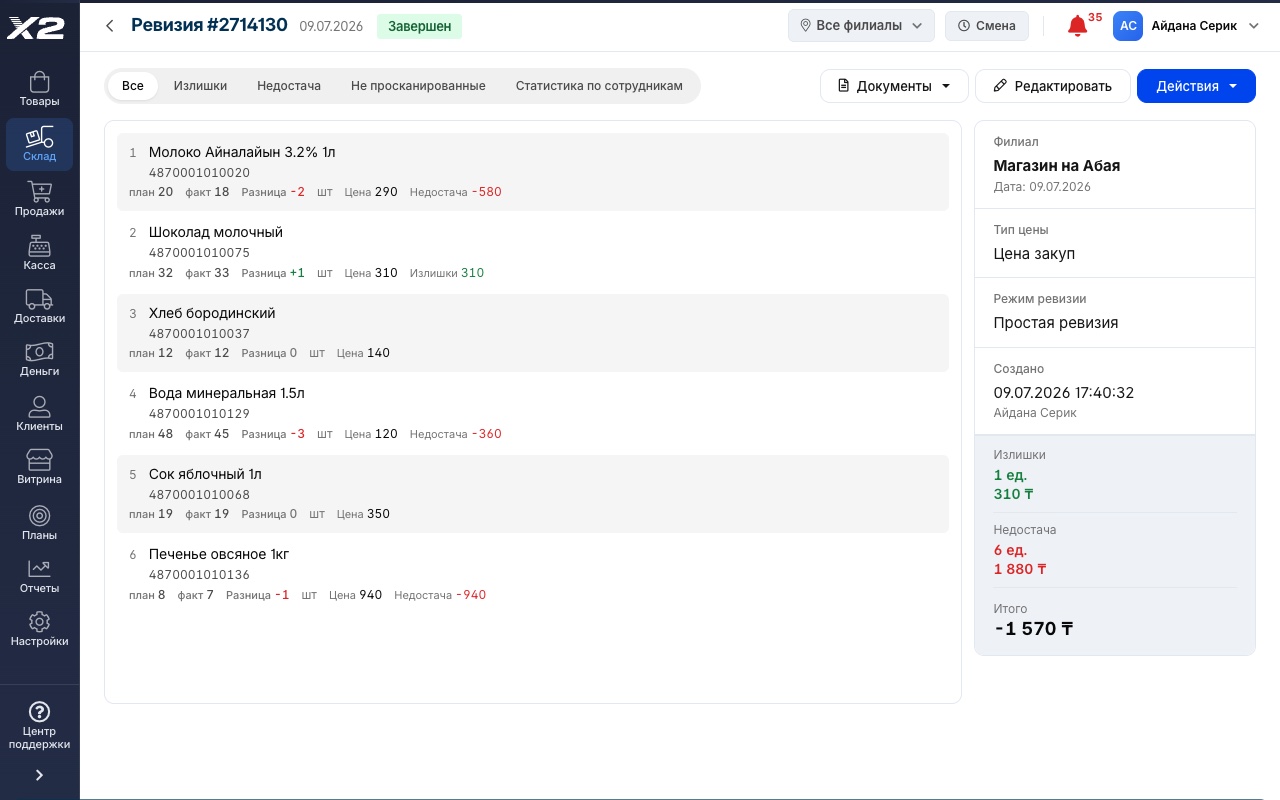
Count your goods with a scanner or phone camera, and X2 checks the count against your records and shows surpluses and shortages in money. The store keeps trading: X2 accounts for sales made during the count.
The consultation is free, with no strings attached

How it works
Start a stocktake
The whole store, one category or selected items. Pick a mode: simple, or one that accounts for sales during the count.
Count the goods
With a scanner, a phone camera or by hand. Several people can count at once, each on their own device.
Post the results
X2 shows surpluses and shortages in money and creates the write-off and stock posting in one click.
Differences at a glance
- For every item: what the records say, what you counted and the difference
- Surpluses and shortages in money, at purchase or retail prices
- A separate list of items nobody has counted yet
Stocktake right from a phone
- The phone camera scans barcodes, no scanner needed
- Staff walk the floor with a phone instead of carrying goods to a computer
- You can see what has been counted and what hasn’t

Sales during the count don’t get in the way
- The store keeps trading while you count. X2 accounts for sales, returns and deliveries since the stocktake began
- If an item sells after it was counted, X2 flags it: recount or confirm as is
- Need a simple stocktake for a set date? There’s a mode for that too
Blind stocktake
- Staff count without seeing how many items the records expect
- Nobody can nudge the numbers to match, so the count stays honest
- The owner sees everything: records, differences and sums
Count together, one total
- Each person counts on their own phone or computer
- X2 adds the counts into one total and shows who counted what
- Per-employee stats download to Excel

The whole store or part of it
All items, only those in stock, one category or selected products. Items you didn’t count aren’t zeroed out.
Scanner, phone or by hand
A regular barcode scanner, a phone camera or search by name. Scale barcodes are read too.
New product mid-count
Found something on the shelf that isn’t in the system? Create the product without leaving the stocktake.
Write-off and stock posting in one click
Shortages go to a write-off, surpluses to a stock posting. The documents are created for you, without duplicates.
Inventory act and reconciliation statement
Both export to Excel, at purchase or retail prices.
Serialized items
Electronics with IMEI and serial numbers are checked unit by unit: you see exactly which phone is missing. Missing numbers are written off, found ones posted to stock.
Counts from a file
Counted with a data collection terminal? Upload an Excel file with barcodes and quantities, and the count lands in the stocktake.
Stock movement statement
Every item’s movement for a period: received, sold, written off and left. Easy to explain any difference.
Heads-up in advance
Before you start, X2 reminds you about unfinished sales and transfers, and before you finish, shows counts that haven’t synced yet.
Frequently asked questions
Do I have to close the store for a stocktake?
No. Choose the mode that accounts for sales: whatever was sold, returned or received while you counted, X2 takes into account. If an item sells after it was counted, X2 offers to recount it or confirm it as is.
What is a blind stocktake?
Staff count without seeing how many items the records expect, so there’s no way to fit the numbers. The owner sees records, differences and sums; staff see them only once the stocktake is finished.
Can I do a stocktake in parts?
Yes. Dairy today, dry goods tomorrow: pick a category or specific items. Items you didn’t count this time aren’t zeroed out.
What do I do about a shortage?
In one click X2 creates a write-off for the shortage and a stock posting for the surplus. To sort it out with whoever is responsible, download the inventory act and reconciliation statement.
Can several people count at once?
Yes, each on their own phone or computer. X2 adds the counts into a common total, and per-employee stats show who counted what.
Do I need to buy a scanner?
No. The phone camera in the X2 app scans barcodes. A scanner is faster, but you can start without one. And if you use a data collection terminal, upload the count as an Excel file.
How long does a stocktake take?
It depends on the size of your stock: a small grocery store with a scanner can be counted in an evening. With two or three people it’s even faster.
See it live in a 15-minute demo
We'll walk you through it using your own store and your own products. Free, with no strings attached.
4300+ stores run on X2 POS · 8 years on the Kazakhstan market · ★ 4.9 rating on 2GIS · 60 reviews